
Configuration reference
Every key in config.yaml — types, defaults, validation rules.
MeshHold reads a single YAML file at startup. On Linux the default location is
~/.meshhold/config.yaml; on Windows the per-user installer puts it under
%LOCALAPPDATA%\MeshHold\config.yaml. Pass --config /path/to/file.yaml to
override.
A minimal config is short — only swarm_key and bootstrap_peers are usually
hand-written, everything else has a sensible default:
swarm_key: "/key/swarm/psk/1.0.0/\n/base16/\n<hex...>"
bootstrap_peers:
  - "/ip4/198.51.100.10/tcp/7777/p2p/12D3KooW..."
An invalid value is surfaced loudly at startup — the daemon refuses to boot
rather than silently downgrade. An unrecognised key is not: it parses,
applies nothing, and stays quiet, because failing on one would break every
node carrying a key from a different build. Run meshhold config lint to find
those, along with any secret still written into this file:
meshhold config lint
Keeping secrets out of this file
Every secret below can come from three places, and resolves in this order:
- the environment variable, where one exists —
MESHHOLD_SWARM_KEY,MESHHOLD_TMDB_API_KEY,MESHHOLD_ACOUSTID_API_KEY - a
*_filepath —swarm_key_file,vaults[].key_file,webhooks[].token_file,node.enrich.*.*_api_key_file. This is what systemd'sLoadCredential=, Docker secrets and Vault's file sink produce. - the inline value — still supported, and reported by
config lint
Env before file before inline is deliberate: the further down that list, the more copies a secret leaves behind, so the tightest form available wins.
A *_file that is set but unreadable is a startup error, not a fallback
to the inline value — otherwise a node could run on a credential you believe
you replaced.
On Git Bash / MSYS, a value starting with
/(the three-line/key/swarm/psk/1.0.0/form) gets path-translated when passed as an environment variable. Use the 64-character hex form, or a*_file.
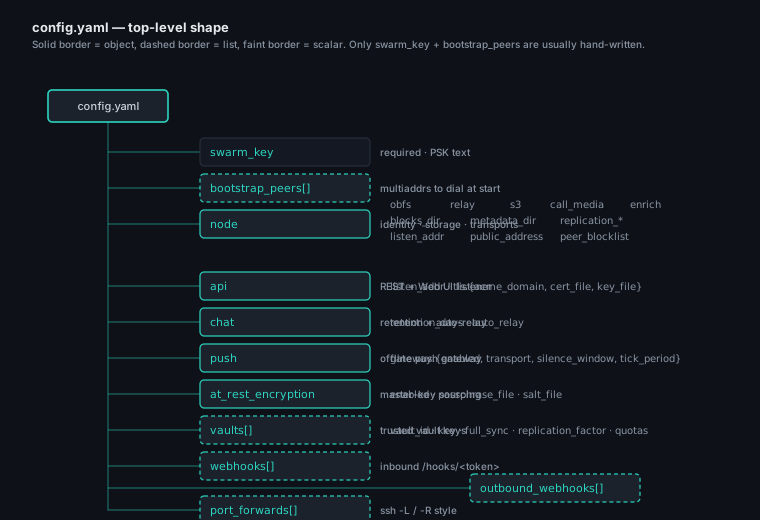
The diagram is a "you are here" key for the tables below — each branch maps to one of the sections on this page.
config.yaml vs the runtime store
The daemon does not write this file. It is yours: template it with
Ansible, keep it in git, diff it. There is exactly one exception, and it is
structural — meshhold at-rest enable/disable and the Settings → Security
button edit at_rest_encryption, because that key decides whether the
database can be opened and therefore cannot live inside it.
config.yaml holds static infrastructure: where state lives
(node.metadata_dir, node.blocks_dir), how the daemon binds and serves
(api, node.listen_addr, TLS, node.obfs) — settings that must exist
before, and independently of, the daemon's database.
Runtime state — the saved networks and which one is active, management
keys, the node's display name, vaults — lives in the daemon's database
(<metadata_dir>/networks.json for networks) and is changed through the Web
UI / CLI, not by editing this file.
Blocks that are a seed, not the source of truth
Some blocks are both: what a fresh node deploys with, and something the Web UI can change afterwards. For those, the runtime store wins once it holds anything, and this file answers only until then:
| Block | Changed at runtime by |
|---|---|
mounts |
the vault card's mount / unmount |
port_forwards |
the Forwards panel, meshhold forwards |
vpn (default route, fail mode, exits, QoS) |
the VPN panel, meshhold vpn |
node.filesend |
the Transfers panel |
tunnel.adblock |
Settings → ad blocker, meshhold adblock |
node.reliable, node.call_media.auto_answer, node.enrich.* |
Settings |
Editing one of these here after the UI has touched it has no effect —
same rule swarm_key follows once networks.json exists. A stored empty
list means empty, not "fall back to the file": unmounting everything
survives a restart.
Split-tunnel routes (vpn.local_routes) and exit-policy rules
(vpn.exit_policy) work differently — those merge with their runtime
counterparts rather than being replaced, and the UI badges the rows that
came from here as config and gives them no delete action.
In particular, network membership is owned by networks.json. The
swarm_key + bootstrap_peers below are a one-time seed for a brand-new
node (empty store): on first boot they become the node's first saved network.
Once the node has any saved network, the store — including its persisted
active network — is the single source of truth, and editing swarm_key
here afterwards is ignored (it can no longer resurrect or switch networks).
Create / join / switch networks with meshhold networks … or the Web UI; the
setup wizard appears only on a genuinely fresh node (no saved network and no
config swarm key).
Top-level keys
| Key | Type | Default | Notes |
|---|---|---|---|
swarm_key |
string | empty | Pre-shared swarm key (/key/swarm/psk/1.0.0/ format). A one-time seed for a fresh node: on first boot (empty store) it becomes the node's first saved network; after that networks.json owns membership and this value is ignored. Empty = limited mode (no P2P). Prefer swarm_key_file or MESHHOLD_SWARM_KEY — see keeping secrets out of this file. See also config vs store; manage networks with meshhold networks. |
swarm_key_file |
string | empty | Read the swarm key from this file instead of inlining it — systemd LoadCredential=, a Docker secret, a Vault file sink. Beaten by MESHHOLD_SWARM_KEY. A path that cannot be read is a startup error, never a silent fallback to swarm_key. |
bootstrap_peers |
list of string | [] |
libp2p multiaddrs to dial at startup. Like swarm_key, a seed for a fresh node — peers added at runtime come via invites and are stored in networks.json. |
node |
object | — | Node-level identity, storage, transports. See node. |
api |
object | — | REST / Web UI listener. See api. |
chat |
object | — | Chat retention + auto-relay. See chat. |
at_rest_encryption |
object | — | Master-key sourcing for Badger + libp2p identity. See at_rest_encryption. |
vaults |
list | [] |
Trusted vaults this node holds keys for. See vaults. |
webhooks |
list | [] |
Inbound webhooks (POST /api/v1/hooks/<token>). See webhooks. |
outbound_webhooks |
list | [] |
Outbound HTTP delivery of mesh events. See outbound_webhooks. |
port_forwards |
list | [] |
ssh -L / ssh -R style TCP/UDP forwards over the tunnel mesh. See port_forwards. |
meshlan |
object | — | Mesh-LAN overlay — reach nodes by a virtual IP. Off by default. See meshlan. |
vpn |
object | — | System exit-VPN: exit selection, boot auto-start, split-tunnel + multi-exit routing. See vpn. |
tunnel |
object | — | Tunnel egress settings. Currently the ad-blocker seed (tunnel.adblock). See tunnel. |
node
| Key | Type | Default | Notes |
|---|---|---|---|
id |
string | derived from identity file | Override only when migrating an identity; normally leave empty. |
name |
string | OS hostname | Display name shown to peers. A runtime meshhold profile set-name (or the Web UI) overrides this — if you set a name there, editing this key + restarting won't change it. Update both to keep them in sync. |
listen_addr |
string | 0.0.0.0:7777 |
libp2p TCP listen address. Ignored when node.obfs is configured (use per-obfs ports). |
key_relay_port |
int | 0 (ephemeral) |
TCP port for the short-lived "receive a key via QR" listener (the web UI's receive button and the key-receive CLI command). 0 picks an OS-chosen port reachable only on the LAN. Pin a fixed port — and open it in the firewall — when the node is reachable only over the internet (e.g. a VPS) so the QR points at an openable port. The listener is up only while a QR is showing and shuts down right after the key arrives. |
reliable |
bool | true |
Marks the node as a long-lived holder candidate for the replication scheduler. |
storage_role |
string | contribute |
How much of the mesh's data this machine keeps. contribute helps each vault reach its replication factor and stops there; hoard keeps everything it has room for, RF met or not; access-only keeps nothing on anyone else's behalf (files still download when opened). Independent of vault keys — a holder never reads what it holds. Profile → Settings → Storage role changes it at runtime and overrides this key; either way it takes effect from the next replication pass, with no restart. |
blocks_dir |
string | <base>/blocks |
Where convergent-encrypted blocks land on disk. |
metadata_dir |
string | <base>/meta |
Badger store + libp2p identity file. |
low_memory |
bool | false (true on Android) |
Shrinks Badger's memtables/caches for constrained hosts. The Android build also installs a Go soft memory limit. Leave off on servers. |
blocks_max_bytes |
int64 | 0 (unlimited) |
Hard cap on the blocks directory in bytes. Replication evicts above this. |
blocks_reserve_bytes |
int64 | 10 GiB |
Free-space floor on the blocks filesystem; replication starts evicting when crossed. |
cache_bytes |
int64 | 0 (off) |
Disk for blocks this node fetched to serve a read but does not hold. A separate ceiling from blocks_max_bytes on purpose: cached blocks never count as copies, are never announced, and are dropped whole under disk pressure before any replica is considered. Profile → Settings → Block cache sets it at runtime and shows the hit rate. |
cache_dir |
string | <base>/blockcache |
Where those cached blocks live. A different directory from blocks_dir so nothing can mistake a cached block for a held one. |
replication_parallel_files |
int | 8 |
How many files the replication cycle downloads concurrently. Raise it to drain a backlog of many small files much faster (rsync-style fan-out instead of one-at-a-time); lower it on a constrained uplink. The per-file block fan-out is separate. |
resources.max_block_streams |
int | 64 |
Cap on concurrent block fetches — one block is one libp2p stream, and past the resource manager's budget the extra streams fail instead of queueing. Omit for the default; a negative value removes the cap. See also resources.conn_low / conn_high / conn_grace_period. |
quic_listen |
string | empty (off) | UDP endpoint (e.g. ":7778") for the QUIC data carrier. Set this on any node used as a VPN exit. Without it a client's flows fall back to a TCP carrier, so a reliable stream carries another reliable stream and large transfers can stall while small requests keep working; meshhold vpn check names the condition. Open the UDP port in the firewall. |
plain_listen |
string | empty (off) | Endpoint (e.g. ":7779") for the plain carrier — a striped TCP pool plus a raw-UDP socket on the same port number, used when QUIC can't come up. Formerly plaintcp_listen, which is still honoured. |
obfsssh_listen |
string | empty (off) | Endpoint for the SSH-masked carrier — the stealth fallback when neither QUIC nor plain is available. See node.obfs. |
replication_min_period |
duration | 20s |
Lower bound on the replication-cycle interval. Go duration string ("1s", "500ms", "2m"). |
replication_max_period |
duration | 60s |
Upper bound on the replication-cycle interval. |
holder_ttl |
duration | 24h |
How long a holder row stays authoritative without a refresh AnnounceHave. |
peer_blocklist |
list of string | [] |
libp2p peer IDs (12D3KooW...) this node refuses to dial or accept. |
public_address |
string | auto-detected | host:port override used when building share invites. Set on VPS nodes. |
mdns_enabled |
bool | true |
LAN mDNS peer discovery. Disable on hardened nodes. |
<base> is ~/.meshhold/ on Linux, %LOCALAPPDATA%\MeshHold\ on Windows.
Inside the official Docker image the daemon runs from
WORKDIR /var/lib/meshhold as uid 65532, so <base> is that directory
and the equivalent defaults become /var/lib/meshhold/blocks and
/var/lib/meshhold/meta. Mount a host path or named volume there to
persist state across container restarts.
Running in Docker
The image is gcr.io/distroless/static-debian12:nonroot underneath, so
there is no shell, no package manager, and no system service manager
inside the container — just the meshhold daemon process holding pid 1.
A few container-only knobs that don't apply to the .deb / .rpm install:
| Knob | Default | Notes |
|---|---|---|
| Container user | nonroot (uid 65532, gid 65532) |
Built into the base image. Volumes you bind-mount must be readable + writable by this uid. |
WORKDIR |
/var/lib/meshhold |
Where the daemon reads blocks/ and meta/ from by default. |
| Config path | /etc/meshhold/config.yaml |
Hardcoded into the ENTRYPOINT. Bind-mount your own with -v $PWD/config.yaml:…:ro. |
MESHHOLD_PASSWORD env |
empty | Idempotent first-run auth bootstrap: stored as an Argon2id hash only if Badger has none yet. Subsequent runs ignore it silently — safe to leave in a long-lived compose file. |
MESHHOLD_SWARM_KEY env |
empty | The swarm key, without putting it in the bind-mounted config. Or mount a Docker secret and point swarm_key_file at /run/secrets/…. |
EXPOSE |
7777/tcp, 8080/tcp |
Documentation only; you still need -p 7777:7777 -p 8080:8080 (or a reverse proxy in front of 8080). |
| Log format | --log-format=json (forced) |
Cooperates with docker logs JSON parsers and shippers (Loki, Vector). Override by appending your own args after the image name. |
The image does not include the systemd unit, the meshhold system
user, or the postinstall password-bootstrap script — those are owned by
the .deb / .rpm packagers. Inside Docker, the container runtime is
your service manager, the named-volume + uid mapping is your file-system
permission model, and the MESHHOLD_PASSWORD env is your auth bootstrap.
node.obfs — masquerade transports
The plain TCP listener is on by default. REALITY and SSH masquerades are opt-in.
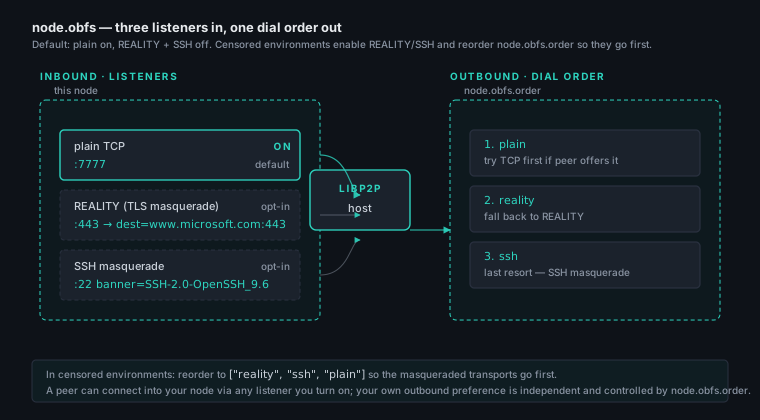
Inbound and outbound are independent: a peer reaches you via any listener
you turn on, and your own outbound dialer walks node.obfs.order in
sequence to pick a transport per peer.
| Key | Type | Default | Notes |
|---|---|---|---|
node.obfs.plain.enabled |
bool | true |
Plain TCP listener. |
node.obfs.plain.port |
int | port of node.listen_addr |
TCP port. Falls back to listen_addr's port if unset. |
node.obfs.reality.enabled |
bool | false |
TLS-REALITY listener. |
node.obfs.reality.port |
int | 0 |
TCP port. |
node.obfs.reality.dest |
string | empty | Upstream the listener forwards unauthenticated TLS handshakes to (e.g. www.microsoft.com:443). |
node.obfs.reality.sni |
string | host part of dest |
Server Name peers send when dialing this node. Required when dest is an address (127.0.0.1:4443), since an IP literal yields no SNI on the wire — the node refuses to start otherwise. See Custom obfs-https front site. |
node.obfs.reality.proxy_protocol |
string | empty | "v1" / "v2" prepends a PROXY-protocol header (visitor's real address) to traffic forwarded to dest. The front server must be configured to expect it; use only with a local front server you control, never an external dest. |
node.obfs.reality.private_key_file |
string | — | Vestigial — nothing reads it. The reality transport authenticates with a marker derived from the swarm key, not an X25519 server key, so this file is never loaded. It is not created on first start either. meshhold config lint reports it; the key is safe to delete. |
node.obfs.reality.fingerprint |
string | auto |
Browser TLS ClientHello this node emits when dialing reality peers (applies even on dial-only nodes). auto = latest Chrome; or pick a family (chrome/firefox/safari/edge/ios); or weighted for a sticky-per-node pick from the global browser mix so a swarm spreads across families instead of every node sharing one JA3. Unknown values warn and fall back to auto. |
node.obfs.ssh.enabled |
bool | false |
SSH-masquerade listener. |
node.obfs.ssh.port |
int | 0 |
TCP port. |
node.obfs.ssh.banner |
string | "SSH-2.0-OpenSSH_9.6p1 Ubuntu-3ubuntu13.5\r\n" |
Banner override. |
node.obfs.order |
list of string | ["plain", "reality", "ssh"] |
Outbound dial priority. Put a masquerade transport first on networks that only pass familiar protocols (e.g. HTTPS-only carriers). |
node.relay — removed
serve, nat_service and auto_dial configured libp2p's Circuit Relay v2,
AutoNAT and AutoRelay. All three are gone and these keys do nothing. They
still parse, so an existing config file keeps loading, and the daemon logs one
warning at startup if any of them is set. A config rewritten by the daemon
comes back without them.
There is no replacement key, because there is no longer a choice to make. Relaying for a neighbour is what a route is — a node on a path forwards for it, and nothing has to be volunteered or reserved. Reachability for a NAT'd node is announced in the topology beat rather than held as a slot on somebody else.
They were removed after being measured: with all three switched off on every node of a two-NAT test stand, every behaviour was unchanged, including the case where a hole punch cannot work and the traffic has to be relayed. A relay reservation was never once made, because libp2p only reserves after AutoNAT reports the node unreachable, and AutoNAT needs four independent peers to observe an address before it will believe one — a number a small private mesh does not have.
node.upnp — automatic IGD port mapping
UPnP IGD (and the legacy NAT-PMP fallback) lets the daemon install
port mappings on the LAN router so peers can dial this node
directly instead of relying on a public relay. At startup the
daemon SSDPs the LAN for an Internet Gateway Device, maps each
libp2p listen port, and injects /ip4/<wan>/tcp/<port> into the
multiaddrs Identify advertises to peers. Per-forward mappings are
also driven through this subsystem when an entry has
open_via_upnp: true.
CGNAT-aware: the router-reported WAN IP is compared against
/api/ipinfo (see node.ipinfo). When they disagree, the daemon
keeps the LAN-side mapping (it can still help mesh peers behind
the same NAT) but suppresses the external-multiaddr announcement
to avoid sending peers a dead-end IP.
| Key | Type | Default | Notes |
|---|---|---|---|
node.upnp.enabled |
bool | true |
Toggles the subsystem. false means the daemon never probes the LAN. |
node.upnp.lease_seconds |
int | 7200 |
Requested mapping lifetime; refresh runs at lease_seconds / 2. |
node.upnp.discover_timeout_seconds |
int | 6 |
Caps the SSDP probe so a LAN without UPnP doesn't drag daemon startup. |
node.ipinfo — external IP + country lookup
At startup (and after any UPnP remap) the daemon does a single
GET /api/ipinfo against the MeshHold marketing site to learn its
own public IP + country code. The values populate the topology
gossip beat (so peers see the IP / flag on their Network page) and
gate the CGNAT comparison described above. Operators in air-gapped
environments turn this off; everyone else can leave it alone.
| Key | Type | Default | Notes |
|---|---|---|---|
node.ipinfo.enabled |
bool | true |
Set false to never call out. |
node.ipinfo.url |
string | https://meshhold.com/api/ipinfo |
Mirror this onto your own deployment if you don't want to use the public endpoint. |
node.ipinfo.timeout_seconds |
int | 5 |
Per-call HTTP timeout. |
node.ipinfo.cache_seconds |
int | 21600 (6 h) |
How long a successful lookup is cached before re-querying. |
node.s3 — S3-compatible listener
Disabled by default. Even when enabled, the admin REST surface
(/api/v1/s3/keys, /api/v1/s3/permissions) is available so keys can be
pre-provisioned.
| Key | Type | Default | Notes |
|---|---|---|---|
node.s3.enabled |
bool | false |
Toggles the listener. |
node.s3.listen_addr |
string | 127.0.0.1:3900 |
Bind address. Loopback default to prevent accidental exposure. |
node.s3.region |
string | meshhold |
Echoed in error responses and used as Sig v4 scope. Clients must match. |
node.s3.max_put_bytes |
int64 | 67108864 (64 MiB) |
Single-PUT cap; larger uploads must use multipart. |
node.s3.base_domain |
string | empty | When set, enables virtual-hosted-style addressing (<bucket>.<base_domain>). |
node.share — public share links
Disabled by default, and the only listener meant to be reached by people with no credentials — so the defaults lean the other way: off, loopback, and a short link lifetime that has to be overridden deliberately. See Public links.
| Key | Type | Default | Notes |
|---|---|---|---|
node.share.enabled |
bool | false |
Toggles the listener. Also the switch for storing what other nodes publish here — there is no second one. |
node.share.listen_addr |
string | 127.0.0.1:8443 |
Bind address. Loopback by default so turning the feature on cannot put it on the public network by accident. |
node.share.base_url |
string | empty | The origin links are built from. Must be what the outside world can reach, which stops being listen_addr as soon as a proxy or forward is in the path. |
node.share.default_ttl |
duration | 168h (7 days) |
How long a new link lives when the creator does not choose. A link that never expires has to be asked for. |
node.share.max_concurrent_per_ip |
int | 8 |
Simultaneous requests one address may have in flight, so one visitor cannot occupy the listener. |
node.share.trusted_proxies |
[]string | empty | Addresses or CIDRs whose X-Forwarded-For is believed when deciding who a request is from. Empty means believe nobody, which is right when the listener faces the internet directly. Set it when something else terminates TLS in front: with nginx in the path and this empty, every visitor arrives as 127.0.0.1 and shares the one concurrency budget above. |
node.share.tls.mode |
string | empty | acme, file, or self-signed. A self-signed certificate is close to useless for a real link — a stranger's browser refuses it. |
node.share.tls.domain |
string | empty | ACME only. Needs base_url's host to resolve here and port 80 reachable for HTTP-01. |
node.share.tls.cert_file |
string | empty | file mode. |
node.share.tls.key_file |
string | empty | file mode. |
node.share.publish.gateways |
[]string | empty | Node ids new links are published to, so they keep working when this machine is off. Empty means live-only. |
node.share.publish.path |
string | <metadata_dir>/share-published |
Where this node stores what others publish to it. Its own directory, never the block store. Set it when the disk with room on it is a different one. |
node.share.publish.max_bytes |
int64 | 0 |
Total published content this node may hold. 0 means only the filesystem bounds it; node.blocks_reserve_bytes is honoured either way. |
node.share.show_scan_status |
bool | false |
Let a share page say what antivirus engines have said about the files in it — one line under the title, a summary only, never a node id. Off because the claim cannot be checked by the person reading it, and because naming your engine and its database version describes your infrastructure to whoever you sent the link to. Gateway-wide rather than per share: per share, the presence of the line would itself say something about the share. See Antivirus scanning. |
node.call_media — headless camera/mic
For Raspberry-Pi-class nodes that auto-answer calls and stream from v4l2 + ALSA.
| Key | Type | Default | Notes |
|---|---|---|---|
node.call_media.enabled |
bool | false |
Headless media-source master switch. Both video_devices and audio_device empty + enabled → off. |
node.call_media.video_devices |
list of string | [] |
v4l2 paths (e.g. /dev/video0); index 0 used at call start, CameraControl{NEXT} rotates. |
node.call_media.audio_device |
string | empty | ALSA device name (default, hw:0,0). Empty = video-only. |
node.call_media.auto_answer |
bool | false |
Fallback default for the auto-answer master switch (accept HMAC-authenticated incoming calls with camera/mic on). Not the runtime source of truth — the Web UI toggle writes a Badger override that wins; this config value applies only when no override is set. Independent of enabled: this decides whether to auto-accept, enabled decides what media source streams once accepted. See the auto-answer note below. |
Auto-answer
node.call_media.auto_answer is the fallback default for the
auto-answer master switch, not its runtime home — that's a Badger
override the Web UI toggle writes, read live by the daemon on every
inbound call, exactly like node.reliable sits beneath the
node_reliable runtime override (see Reloading).
Resolution: the override wins when present; absent, this config value
applies; unset here too → off. Toggling it in the UI does not rewrite
config.yaml — it writes the override, which then wins until cleared.
You set it from config purely to provision a headless node that never
opens the Web UI; everywhere else just use the toggle (or
PUT /api/v1/settings {"auto_answer": true}).
When on, the daemon accepts an incoming audio/video call automatically —
camera + mic enabled — but only when the caller proves possession of one
of this node's self management keys that grants the camera capability
(an HMAC over the call invite). The HMAC is the real authorisation;
auto_answer only opens the gate. Setting it without also issuing a
camera-capability mgmt key to the caller does nothing — see step 5 of
the walkthrough below for the full checklist.
node:
  call_media:
    auto_answer: true   # headless default: accept HMAC-authenticated calls
Linux setup walkthrough
Headless capture is Linux-only — the daemon shells out to ffmpeg and
talks to the kernel's v4l2 + ALSA subsystems directly. A working
config has four moving parts: ffmpeg on PATH, real device nodes
under /dev, the meshhold user in the right groups, and the
companion profile/mgmt-key flags that actually let a peer reach the
camera.
1. Install ffmpeg with the right encoders. The daemon hard-codes
the encoding pipeline (audio: Opus 32 kbps mono in Ogg; video:
libvpx-vp9 1.5 Mbps in IVF, 1280×720 @ 30 fps, keyframe every 2 s).
The ffmpeg binary on PATH must therefore be built with
--enable-libopus, --enable-libvpx, --enable-libv4l2, and
--enable-indev=alsa. The distro packages on Debian / Ubuntu /
Raspberry Pi OS (apt install ffmpeg) and on RHEL / Fedora
(dnf install ffmpeg, from RPM Fusion) cover all four. There is no
ffmpeg_path knob — symlink or wrap your binary if it lives outside
PATH.
2. Discover the device nodes. Plug the camera/USB-capture in, then:
# list video capture devices and the /dev/videoN node each exposes
v4l2-ctl --list-devices

# list ALSA capture (microphone) devices and their hw:CARD,DEV names
arecord -L
USB Video Class cameras almost always expose two /dev/videoN
nodes — one for capture, one for metadata. v4l2-ctl --list-formats-ext
-d /dev/videoN is the quickest way to confirm which one delivers
1280×720 at 30 fps in a pixel format ffmpeg can ingest (YUYV, MJPG,
or NV12). Cameras that only offer e.g. 1920×1080 will make ffmpeg
exit on the first frame — adjust the camera, not the config.
3. Grant the daemon access to /dev. The .deb / .rpm
postinstall creates a meshhold system user but does not add it
to the video or audio groups. Out of the box the daemon will get
EACCES opening /dev/video0. Run once, then restart the service:
sudo usermod -aG video,audio meshhold
sudo systemctl restart meshhold
The Docker image runs as uid 65532 (nonroot); pass the host
device through with --device /dev/video0 --device /dev/snd and add
--group-add video --group-add audio (or --group-add with the
numeric GID of those groups on the host) so the container user can
read them.
4. Wire the YAML. Two-camera, with-mic example:
node:
  call_media:
    enabled: true
    video_devices:
      - "/dev/video0"   # used at call start; SPECIFIC matches by path
      - "/dev/video2"
    audio_device: "default"   # or "hw:1,0" to pin a specific USB mic
audio_device is forwarded verbatim to ffmpeg -f alsa -i <value> —
anything arecord -L prints is valid. Leave it empty for a
video-only privacy build (e.g. a doorbell with no microphone). At
least one of the two fields must be non-empty when enabled: true,
otherwise the daemon logs a warning at startup and falls back to
disabled.
5. Make the camera actually reachable. YAML on its own only spawns the local pipeline; two other knobs decide whether any peer can use it:
- Auto-answer must be on. Flip the toggle in the Profile page in the
Web UI, or
PUT /api/v1/settings { "auto_answer": true }, or — on a headless box with no browser — set the fallback defaultnode.call_media.auto_answer: truein config (see the Auto-answer note above). Without it the daemon rings instead of accepting the call, and a headless box has nothing to answer the ring with. - A management key with the
cameracapability has to be issued to the calling device (meshhold mgmt-keys add --caps camera, or the Mgmt Keys panel in the Web UI). The HMAC proof on the call invite is the sole authorisation; if no active self-key carriesCapCamera, auto-answer is disabled regardless of the other flags. - On Linux the
allow_callsprofile flag defaults to false, so peers' Network pages hide the call buttons to this node. Flip it on in the Profile page once the headless pipeline is wired, otherwise the only way to dial in isPOST /api/v1/calls.
node.enrich — metadata enrichment
Disabled by default — operators turn this on for one node per LAN so AcoustID / TMDB lookups don't get duplicated.
node.enrich.music
| Key | Type | Default | Notes |
|---|---|---|---|
node.enrich.music.enabled |
bool | false |
Worker only constructs when true. Ingest enqueues unconditionally. |
node.enrich.music.acoustid_api_key |
string | empty | Required when enabled. Free at acoustid.org/api-key. Falls back to MESHHOLD_ACOUSTID_API_KEY. |
node.enrich.music.user_agent |
string | project default | UA header sent to MusicBrainz. |
node.enrich.music.fpcalc_path |
string | $PATH |
Chromaprint binary location. |
node.enrich.music.poll_interval_seconds |
int | 30 |
How often the worker sweeps the enrich queue. |
node.enrich.video
| Key | Type | Default | Notes |
|---|---|---|---|
node.enrich.video.enabled |
bool | false |
Master switch. |
node.enrich.video.tmdb_api_key |
string | empty | Falls back to the catalog settings keystore, then MESHHOLD_TMDB_API_KEY. |
node.enrich.video.language |
string | en-US |
BCP-47 tag TMDB localises titles + overviews to. |
node.enrich.video.user_agent |
string | project default | UA header sent to TMDB. |
node.enrich.video.poll_interval_seconds |
int | 30 |
Worker sweep interval. |
node.enrich.video.top_cast |
int | 10 |
Cast members written to each VideoMeta row. |
node.enrich.video.ffprobe_path |
string | $PATH |
Used by the on-open track scanner; independent of enabled. |
node.enrich.video.ffmpeg_path |
string | $PATH |
Used for server-side audio-track remux + embedded-subtitle extraction. |
api
| Key | Type | Default | Notes |
|---|---|---|---|
api.listen_addr |
string | 0.0.0.0:8080 |
REST + Web UI listener. |
api.tls.acme_domain |
string | empty | When set, the daemon obtains a Let's Encrypt cert for this domain via HTTP-01. |
api.tls.cert_file |
string | empty | PEM-encoded certificate path. Both cert_file + key_file must be set together. |
api.tls.key_file |
string | empty | PEM-encoded private key path. |
Leave all three TLS fields empty to fall back to a self-signed certificate generated on first run.
chat
| Key | Type | Default | Notes |
|---|---|---|---|
chat.retention_days |
int | 30 |
Caps how long incoming chat messages are held. 0 disables the cap ("store forever"). All messages get clamped at receive time. |
chat.auto_relay |
bool | true on desktop, false on mobile |
When on, the node subscribes to + persists ciphertext for unknown rooms it sees, bounded by retention_days. |
at_rest_encryption
Master-key sourcing for the daemon's at-rest encryption layer (Badger, libp2p identity, networks store — which is where the swarm key lives).
Leaving enabled unset means encrypt — but what that implies depends
on what the node already has on disk:
| Node | With no enabled: setting |
|---|---|
| Fresh (no metadata store yet) | encrypted from the first boot |
| Existing, holding plaintext data | left alone, warns on every start, offers to convert |
An existing node is not migrated automatically because migrating takes it
offline for the duration and commits it to a key store that has to keep
working afterwards. Convert it with meshhold at-rest enable (or
Settings → Security) and a restart; see
at-rest.
An explicit enabled: true or enabled: false overrides all of that, for
both kinds of node.
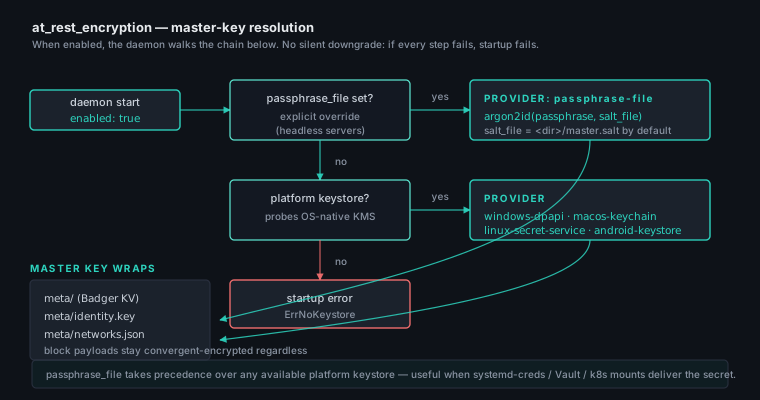
The master key comes from the first source available, in this order:
passphrase_file, when set — always wins, so you can opt out of the platform keystore anywhere and feed the secret yourself from systemd-creds, Vault, or a Kubernetes secret mount.- The platform keystore: DPAPI (Windows, user scope), Keychain (macOS), Secret Service (Linux desktop), Android Keystore (Android).
- A host-bound key file (Linux only), when no Secret Service is reachable — see below.
Failure to obtain a key with enabled: true is a hard startup error —
the daemon never silently downgrades to plaintext storage.
Headless Linux
Secret Service needs a session D-Bus, which a VPS reached over SSH, a
systemd unit and a container all lack. On those hosts the daemon falls
back to a host-bound key file at <metadata_dir>/master.key.host: the
master key is stored wrapped, under material derived from the host's
/etc/machine-id.
Because the machine-id lives outside the metadata dir, a copy of the data
volume on its own — a backup, an rsync of the state directory, a
detached cloud disk — cannot unwrap it. It does not protect against
local root or a full disk image, which get both halves; for that, point
passphrase_file at a secret you manage, or rely on LUKS.
If the machine-id changes, the key cannot be unwrapped and the daemon refuses to start rather than mint a new one over an encrypted database. Two consequences worth planning for:
- Containers: mount a stable
/etc/machine-id, or usepassphrase_file. An image with a per-build machine-id will strand the volume on the first container recreation. - Re-imaging: restore
/etc/machine-idalong with the data directory, or runmeshhold at-rest disableon the old host first.
| Key | Type | Default | Notes |
|---|---|---|---|
at_rest_encryption.enabled |
bool | unset | Unset means encrypt a fresh node and offer to convert an existing one (see above). true forces encryption either way; false forces plaintext either way. Failure to obtain the key with encryption on is a hard startup error — no silent downgrade to plaintext. |
at_rest_encryption.passphrase_file |
string | empty | When non-empty, forces the passphrase-file provider regardless of any available platform keystore. Use it on headless servers where systemd-creds / Vault / Kubernetes mounts deliver the passphrase. |
at_rest_encryption.salt_file |
string | derived | Per-host KDF salt path. Empty defaults to <dirname(passphrase_file)>/master.salt. |
Turning this on is close to a one-way door by design: once the state is
encrypted, a daemon that cannot obtain the master key refuses to start
rather than overwrite it. meshhold at-rest disable --yes is the
supported way back, and it needs the master key to work — so it can
rescue a node whose config is wrong, not one whose key is genuinely
lost. Keep whatever the key derives from (the keyring entry, the
passphrase file, /etc/machine-id) backed up alongside the data.
vaults
A list of trusted vaults — the node holds the symmetric key for each entry and decrypts file metadata locally.
| Key | Type | Default | Notes |
|---|---|---|---|
vault_id |
string | required | Stable 32-byte vault identifier. |
name |
string | required | Display name. |
key |
string | required | Vault encryption key (URL-safe base64). |
storage_path |
string | <blocks_dir>/<vault_id> |
Filesystem path for materialised files when full_sync: true. |
full_sync |
bool | false |
When true, the node materialises every file in the vault onto disk under storage_path. false keeps blocks only. |
replication_factor |
int | 3 |
Target number of holders the replication scheduler aims for. |
type |
string | storage |
storage (default) for file vaults, chat for chat rooms. Crypto + trust model identical between types. |
ingest_coalesce_seconds |
int | 60 |
Window inside which a fresh local edit replaces the previous FileVersion row in filehistory/. 0 = every edit appends a new row. Must be >= 0. |
hard_quota_bytes |
int64 | 0 (none) |
Cap on the vault's disk footprint. Uploads past the cap are rejected with HTTP 507. |
soft_quota_bytes |
int64 | 0 (none) |
Informational threshold flagged in analytics. Must be <= hard_quota_bytes when both are set. |
keep_history |
bool | false |
Folder-backed vaults only. Keep this node's version history by storing real ciphertext blocks instead of sidecar pointers (~2× footprint). Without it a file-mode vault cannot restore old versions. Per-node — each node decides independently. |
history_retention |
map | keep all | {mode: all \| count \| days \| staggered, value: N} — how much retained history this node keeps on disk. count keeps the newest N versions per file, days keeps versions within N days, staggered thins Syncthing-style (denser recent, sparser old) up to N days max age. A background worker (and the "Trim history now" action) reclaims the rest. |
ignore_globs |
list | [] |
Gitignore-style patterns the scanner skips under storage_path, on top of built-in defaults (dotfiles, Thumbs.db, desktop.ini, *.tmp/.swp/.part, ~$*) and an optional .holdignore file in the folder root. !-prefixed lines re-include. |
webhooks
Inbound webhooks accepted on POST /api/v1/hooks/<token> (and GET for
trigger-style integrations). The URL token is the only credential.
| Key | Type | Default | Notes |
|---|---|---|---|
name |
string | required | Unique slug used for logs / audit. Not part of the URL. |
token |
string | required | URL-path secret. Unique across the list, >= 8 chars, no slashes or whitespace. |
action |
string | required | call or message. |
target_node_id |
string | — | libp2p peer ID of the callee. Required for action: call. Must be empty for action: message. |
video |
bool | false |
When true the call is audio+video; only meaningful for action: call. |
room_id |
string | — | Chat-vault ID the message is published into. Required for action: message. Must be empty for action: call. |
text |
string | empty | Fixed message text — request body is ignored when set. Only meaningful for action: message. |
fallback_text |
string | empty | Used when text is empty and the request body yielded no extractable text. Empty fallback + empty extracted text → 400. |
Bodies are parsed as Slack-shape JSON, application/x-www-form-urlencoded
with payload=<json>, or text/plain. There is no rate-limit and no
loopback bind — operators put a reverse proxy in front when needed.
outbound_webhooks
Outbound HTTP delivery of mesh events. Bodies are unsigned JSON; operators who want auth put the receiver behind a reverse proxy.
| Key | Type | Default | Notes |
|---|---|---|---|
name |
string | required | Unique slug used as the queue-row tag. |
url |
string | required | http:// or https:// only. |
events |
list of string | required, non-empty | Subscribed event names. Typos are rejected at load. |
give_up_after_seconds |
int | 86400 (24 h) |
Retry budget cap. 0 disables retries (one shot, drop on failure). Negative is rejected. |
Known event names: file.added, file.updated, file.deleted,
chat.message, peer.connected, peer.disconnected, tunnel.opened,
tunnel.closed, replication.lag, forward.opened, forward.closed.
The retry schedule is 5s → 30s → 5min → 30min, then capped.
port_forwards
ssh -L / ssh -R / ssh -D style forwards routed over the libp2p
tunnel mesh. Inherits multi-hop routing and libp2p Circuit Relay v2.
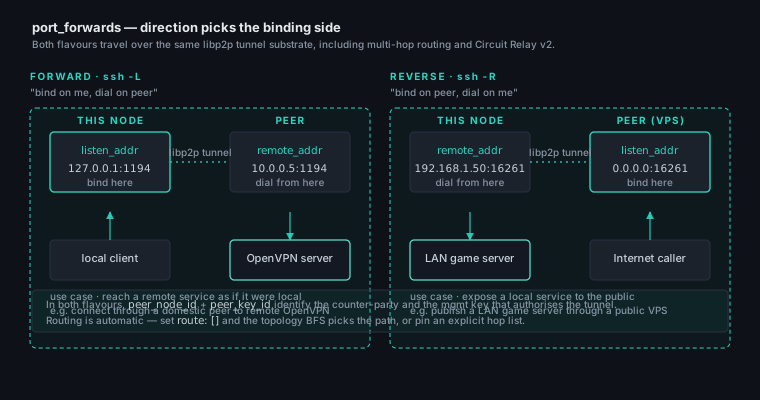
forward and reverse differ only in which side of the tunnel binds the
listener and which side dials the actual destination. The two examples
below at the bottom of this page show one of each. dynamic is the third
shape: this node binds a SOCKS5 listener and each client names its own
destination, which the peer dials — so there is no remote_addr at all.
| Key | Type | Default | Notes |
|---|---|---|---|
id |
string | derived | Opaque handle. Empty in hand-edited YAML → deterministic ID derived from name. |
name |
string | required | Human-readable label, unique across the list. |
direction |
string | required | forward (ssh -L: bind locally, dial peer-side), reverse (ssh -R: peer binds, dials back here), or dynamic (ssh -D: bind a local SOCKS5 proxy, peer dials each client's destination). |
proto |
string | required | tcp or udp. Filled in as tcp for dynamic, which rejects udp — a SOCKS5 control port is TCP and datagrams ride it in-band via UDP ASSOCIATE. |
listen_addr |
string | required | Bind address on whichever side actually listens. :port is filled with 127.0.0.1 for forward / dynamic and 0.0.0.0 for reverse. |
remote_addr |
string | required | Dial destination on whichever side does the dialing. Must split into host:port. Must be empty for dynamic. |
peer_node_id |
string | required | libp2p peer ID of the counter-party. |
peer_key_id |
string | derived | Peer mgmt key in this node's store. Optional: keys record the node they were issued for, so peer_node_id finds one. Set it only when you hold several different keys for that node. The tunnel still refuses to come up without an authorised key. |
route |
list of string | [] |
Explicit hop list. Empty → topology BFS picks the path. |
autostart |
bool | true |
When false, the entry stays in config but dormant until POST /forwards/:id/start. |
open_via_upnp |
bool | false |
Ask the listener-side router to forward the port through UPnP. For forward this is the local router; for reverse it's the peer's router. Best-effort: a router without UPnP just leaves the listener LAN-only. Requires node.upnp.enabled (the default). Refused for dynamic — a listener that reaches any destination is not one to publish to the internet by ticking a box. |
socks_username |
string | empty | dynamic only. Turns on RFC 1929 authentication for the SOCKS5 listener; both credential fields or neither. Without them the listener accepts anyone who can reach it — fine on 127.0.0.1, an open relay anywhere else. |
socks_password |
string | empty | Companion to socks_username. Compared byte for byte against what the client sends, so leading/trailing whitespace is kept. Write-only through REST: it is never read back, and diagnostics bundles report only whether auth is on. |
meshlan
The mesh-LAN overlay: a routable virtual network where
every member reaches another member's local services by a stable virtual
IP. Off by default. Membership and the per-node port ACL live on the
meshlan management keys, so this block only turns the overlay on and
picks the IPv4 space.
| Key | Type | Default | Notes |
|---|---|---|---|
enabled |
bool | false |
Optional / legacy — no longer required. The overlay auto-starts as soon as the node holds a mesh-route key (holding the key is membership). Left in only to force the mesh range reserved from the exit VPN before a key is added. Supported on Linux (needs /dev/net/tun + CAP_NET_ADMIN) and Windows (via the meshhold-vpnhelper Wintun adapter); other platforms log and stay idle. |
ipv4_range |
string | 10.0.0.0/8 |
IPv4 space for the overlay. Each address is [net:8][node:8][device:8] (one octet each): the meshlan key picks one of 256 /16 networks inside the range, the node id picks a slot (1..255; slot 0 is the DNS resolver), the device picks the host (1 = the node, 2.. = forwarded LAN devices). So one node holding several keys gets a distinct IP per network, all within this range. Must be a /8 (24 host bits). The default 10.0.0.0/8 is RFC 1918 and doesn't overlap Tailscale's 100.64/10, but — being private space — it CAN overlap a LAN that also uses 10.x. The mesh is IPv4-only. If your host's own DNS server or default gateway falls inside this range, the Linux daemon keeps it reachable with a more-specific /32 route and logs a warning; if a whole LAN subnet clashes, point ipv4_range at another /8 you control. |
dns_suffix |
string | mesh |
MagicDNS zone — a node named "NAS" answers as nas.mesh. While the system VPN is up the daemon makes the in-mesh resolver the system DNS (Linux resolvectl default route, Windows NRPT, Android VpnService), so every lookup flows through it. |
dns_upstream |
string | 1.1.1.1:53 |
Fallback resolver for non-mesh names. Normally the daemon forwards to the host's original DNS (captured at bring-up); this value is used only when that can't be detected. Empty refuses non-mesh names instead of forwarding. |
forwards |
list | [] |
LAN devices this node fronts on the mesh (subnet router). Each {name, target} gets its own virtual IP + <name>.mesh; the node proxies to target (a LAN host/IP — no port, the caller's port is preserved). Open ports follow the meshlan key's scope. |
meshlan:
  # No config needed to join: the overlay auto-starts once this node holds
  # a meshlan management key. Set ipv4_range only to move off the default.
  # ipv4_range: 10.0.0.0/8
Create or join a network with a meshlan management key and the overlay
comes up automatically — see the Flat Mesh LAN
walkthrough.
vpn
The system exit-VPN's routing model — exit selection, boot auto-start, the
configurable split-tunnel exclusions, and per-destination multi-exit policy.
See Exit routing
for the concepts. The route-install layer runs on Windows (vpnhelper),
Linux (/dev/net/tun), and Android (VpnService); macOS isn't a client
yet (still a fine exit node). The Exit nodes section and the
meshhold vpn CLI write this block.
| Key | Type | Default | Notes |
|---|---|---|---|
enabled |
bool | false |
Bring the system VPN up at daemon start (deploy-and-forget). Honoured where the daemon owns the interface — Windows and Linux. No exit required (a mesh-only overlay is valid); vpn up brings it up live without a restart. |
exit_node_id |
string | empty | libp2p peer ID of the default exit. Required when enabled and default_route: exit. |
peer_key_id |
string | empty | Peer-mgmt-key id authorising the default exit dial. Optional — the key stored for exit_node_id is used. Set it only to choose between several different keys for that node. |
exit_name |
string | empty | Optional display label for the exit. |
fail_mode |
string | drop |
What happens to exit-bound traffic when the exit is down: drop (fail-closed, no leak) or direct (fail-open out the host until it returns — Windows/Linux/Android, else falls back to drop). |
default_route |
string | exit |
Where traffic matching no policy rule (and not mesh/excluded) goes: exit (full tunnel via exit_node_id), direct (selective VPN — only exit_policy destinations are tunnelled), or drop. |
auto_local_subnets |
bool | true |
Keep the host's own directly-connected LAN subnets off the tunnel (so LAN + same-subnet RDP survive a full tunnel). Individual subnets can be forced back through the exit via disabled_auto_subnets. |
disabled_auto_subnets |
list of string | [] |
Auto-detected host subnets (CIDRs) routed through the exit instead of kept local. Only meaningful with auto_local_subnets: true. |
local_routes |
list of string | [] |
Custom IPv4 CIDRs kept local (off the exit). Runtime-added routes (CLI/UI/REST) live in a store bucket and merge on top. |
exit_policy |
list | [] |
Multi-exit rules: each {prefixes, exit_node_id, peer_key_id?, priority?, name?, note?} routes those destination prefixes through that exit (peer_key_id optional — the exit node id finds the key). For a destination the dialer tries matching exits highest-priority-first and fails over down the chain (prefix length is only the tiebreak among equal priorities). 0.0.0.0/0 is allowed (a full-tunnel rule); duplicate exact (prefix, exit) pairs and loopback/link-local are rejected. |
qos |
object | off | Egress / download QoS (traffic prioritisation + shaping). {enabled, uplink_kbits, downlink_kbits, default_class, classes[], rules[]}. Rates are kilobits/s (0 = no cap → ordering only). classes are priority levels (highest first, ≤8), each {name, max_kbits or max_percent ceiling, demote_after_kb}. rules map flows to a class (first match wins), each {proto, dport_lo, dport_hi, dst_cidr, class, direction} with direction out/in/both. downlink_kbits is shipped to the exit, which shapes the incoming direction. Applied live (no session drop). See QoS. |
vpn:
  enabled: true
  exit_node_id: "12D3KooW…HOME"
  peer_key_id: "home-tunnel"
  fail_mode: direct          # fail-open if the exit drops (Windows/Linux/Android)
  default_route: exit        # full tunnel; rules below override per-destination
  local_routes:
    - 192.168.50.0/24        # lab subnet stays local
  exit_policy:
    - name: "EU sites via Frankfurt"
      prefixes: ["203.0.113.0/24"]
      exit_node_id: "12D3KooW…FRA"
      peer_key_id: "fra-tunnel"
  qos:
    enabled: true
    uplink_kbits: 18000        # ~90% of a 20-megabit uplink
    downlink_kbits: 95000      # shaped at the exit
    default_class: 1
    classes:
      - name: interactive      # DNS, VoIP, gaming — highest priority
      - name: bulk             # everything else
        max_percent: 50        # cap bulk at half the link
        demote_after_kb: 4096  # a flow that moves >4 MiB drops to bulk
    rules:
      - proto: udp
        dport_lo: 53
        dport_hi: 53
        class: 0               # DNS -> interactive
        direction: both
tunnel
Tunnel egress settings. Today this carries only tunnel.adblock — the
seed for the ad blocker: a domain blocklist merged from configurable
sources and enforced on the in-app tunnel browser (CONNECT proxy) and/or
the system VPN. On the VPN it's applied by the in-mesh resolver, which is the
system DNS while the VPN is up — so blocked names get NXDOMAIN'd for every
app on the device, not just tunnelled traffic. This block is the headless
default; once
the Settings dialog or meshhold adblock saves an
override it lives in the runtime catalog store and wins over this seed.
A node with no tunnel.adblock block uses the built-in defaults (the
embedded list + the StevenBlack adware+malware list + HaGeZi Pro enabled;
fake-news, gambling, porn and social listed but off), applied to both
targets. HaGeZi Pro is a broad hosts aggregate that adds video-ad and
CIS/RU network coverage StevenBlack lacks; overlapping domains dedupe into
the shared blocklist at no extra cost.
| Key | Type | Default | Notes |
|---|---|---|---|
adblock.js_blocking |
bool | true |
In-page JavaScript cosmetic ad-hiding in the tunnel browser (Android/Windows). |
adblock.apply_browser |
bool | true |
Apply the domain filter to the in-app tunnel browser. |
adblock.apply_tunnels |
bool | true |
Apply the domain filter to the system VPN. The in-mesh resolver (the system DNS while the VPN is up) NXDOMAINs blocked names for every app on the device. |
adblock.sources |
list | builtin | Blocklist feeds; each {name, url, enabled}. url: builtin:meshhold is the embedded list. |
tunnel:
  adblock:
    js_blocking: true
    apply_browser: true
    apply_tunnels: true
    sources:
      - name: MeshHold built-in list
        url: builtin:meshhold
        enabled: true
      - name: Ads & malware — StevenBlack
        url: https://raw.githubusercontent.com/StevenBlack/hosts/master/hosts
        enabled: true
      - name: Ads, trackers & video-ad networks — HaGeZi Pro
        url: https://raw.githubusercontent.com/hagezi/dns-blocklists/main/hosts/pro.txt
        enabled: true
      - name: Gambling & casinos — StevenBlack
        url: https://raw.githubusercontent.com/StevenBlack/hosts/master/alternates/gambling/hosts
        enabled: false
Remote lists are downloaded directly (not through the tunnel), cached under the metadata dir, and refreshed periodically. DNS sinkholing only covers plain UDP/53 queries — clients using DoH/DoT bypass it.
Example: VPS exit node
A public-reachable VPS that serves as a relay and exposes the S3 listener over loopback (for a local Caddy reverse proxy):
# The key lives in a file systemd hands the unit, not in this config:
#   LoadCredential=swarm:/etc/meshhold/swarm.key
swarm_key_file: "/run/credentials/meshhold.service/swarm"
bootstrap_peers: []  # this IS the bootstrap

node:
  name: "exit-fra-01"
  listen_addr: "0.0.0.0:7777"
  reliable: true
  public_address: "exit.example.org:7777"
  relay:
    serve: true
  s3:
    enabled: true
    listen_addr: "127.0.0.1:3900"
    base_domain: "s3.example.org"
  enrich:
    music:
      enabled: true
      acoustid_api_key_file: "/run/credentials/meshhold.service/acoustid"
    video:
      enabled: true
      tmdb_api_key: "..."

api:
  listen_addr: "0.0.0.0:8080"
  tls:
    acme_domain: "node.example.org"

chat:
  retention_days: 90

outbound_webhooks:
  - name: "ops-slack"
    url: "https://hooks.slack.com/services/..."
    events: ["replication.lag", "peer.disconnected"]
Example: home gateway with port forwards
Expose a LAN game server to the Internet through a VPS peer:
port_forwards:
  - name: "zomboid-public"
    direction: "reverse"
    proto: "tcp"
    listen_addr: "0.0.0.0:16261"   # VPS-side bind
    remote_addr: "192.168.1.50:16261"  # LAN server
    peer_node_id: "12D3KooW..."
    peer_key_id: "vps-tunnel"
    # Ask the VPS's host network to expose the port through UPnP
    # too. On a cloud VM this is usually a no-op (no IGD), but
    # on a colo / bare-metal exit it can save a manual port-forward
    # configuration step.
    open_via_upnp: true

  - name: "openvpn-into-home"
    direction: "forward"
    proto: "udp"
    listen_addr: "127.0.0.1:1194"      # local bind
    remote_addr: "192.168.1.1:1194"    # remote LAN OpenVPN
    peer_node_id: "12D3KooW..."
    # peer_key_id is optional — the node id above finds the key. Name
    # one only when you hold several different keys for that node.

  - name: "socks-via-vps"
    direction: "dynamic"               # ssh -D: a local SOCKS5 proxy
    listen_addr: "0.0.0.0:3388"        # reachable from the LAN, hence the credentials
    peer_node_id: "12D3KooW..."        # every client names its own destination,
                                       # so there is no remote_addr at all
    socks_username: "alice"
    socks_password: "s3cret"
Reloading
Most fields require a daemon restart. Two sets do not:
Never in this file at all — runtime state, changed through the REST surface:
- Vault membership:
POST /api/v1/vaultswrites to Badger, not the YAML. - Management keys:
meshhold mgmt-keys/MgmtKeysPanelin the Web UI. - S3 access keys + per-bucket permissions:
/api/v1/s3/keys,/api/v1/s3/permissions.
Seeded here, then owned by the store — see blocks that are a seed. Changing one of these through the UI or CLI takes effect without a restart and does not touch this file; editing it here afterwards has no effect.
When in doubt, edit config.yaml, run meshhold config lint to catch
typos and misplaced secrets, then systemctl restart meshhold (or the
equivalent on your platform).